Data Protection & E-Waste: What Happens to Your Data When an Electronic Device Leaves Your Control?
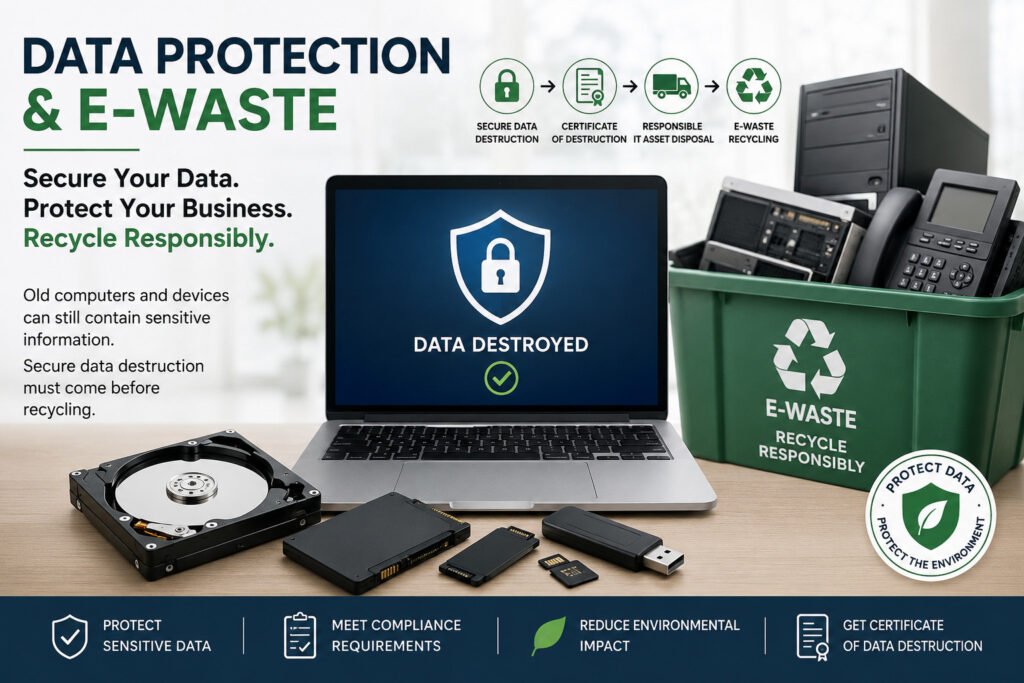
An old computer may look like nothing more than obsolete equipment. But before it becomes e-waste, there is another question businesses and organisations should ask: What happened to the data stored on it? Computers, laptops, servers, hard drives, SSDs, phones and other electronic devices can contain personal, confidential and sensitive information long after they are no longer being used. Simply deleting files, emptying the recycle bin or formatting a device does not necessarily mean that the information has been securely destroyed. This creates an important connection between data protection and e-waste management. A device can be physically disposed of while the data on it remains exposed. When electronic equipment leaves an organisation without proper data sanitization or destruction, information may potentially be recovered or accessed by unauthorised persons. For businesses in Kenya, secure disposal should therefore mean more than simply getting rid of unwanted equipment. The data needs to be securely addressed before the equipment is reused, transferred, recycled or destroyed. What Data Can Be Left on an Old Computer? An end-of-life computer can contain much more information than users realise. Depending on how the device was used, it may contain: Even when a computer is no longer operational, its storage media may still contain information. That is why the condition of the device does not determine whether the data is still a risk. Data Controller or Data Processor? When an organisation owns the information stored on its devices and determines why and how that personal data is processed, it may act as a Data Controller. When a service provider processes personal data on behalf of that organisation—for example, by handling devices containing personal data for secure destruction—it may act as a Data Processor. This distinction is important when outsourcing IT asset disposal and data destruction. In such circumstances, the parties should clearly understand their respective responsibilities, contractual obligations and data protection requirements. This is why professional IT Asset Disposition and data destruction should be handled through defined procedures rather than simply handing old computers to an unknown disposal channel. Data Wiping vs Physical Data Destruction Not every device needs to be physically destroyed. The appropriate method depends on factors such as the type and condition of the storage media, whether the equipment will be reused, the client’s requirements and the level of assurance required. Secure Data Sanitization Where equipment or storage media is suitable for continued use, an appropriate sanitization method can be used to remove data before the asset is reused or redeployed. The objective is to ensure that previous information cannot be accessed by an unauthorised party. Physical Destruction Where storage media is damaged, unsuitable for reuse, at end-of-life, or where physical destruction is required, the storage media can be physically destroyed. For example, hard drives and SSDs can undergo controlled destruction so that the stored information cannot practically be recovered from the resulting media. The right method should be selected based on the asset and the required level of data protection — not simply convenience. What Should Happen Before an Old Computer Is Recycled? A responsible process should address both the data and the equipment. A typical secure IT asset disposal process can include: 1. Identify the equipmentRecord relevant asset information such as device type, quantity and serial numbers where applicable. 2. Secure the equipmentMaintain appropriate control over devices while they are awaiting processing. 3. Assess the storage mediaDetermine what type of storage is present and what disposal or sanitization method is appropriate. 4. Sanitize or destroy the dataUse an appropriate secure data sanitization or physical destruction method. 5. Verify and document the processMaintain appropriate records demonstrating what was processed and how. 6. Provide certificationWhere applicable, provide documentation or a Certificate of Data Destruction to support the client’s records. 7. Recycle responsiblyAfter data security requirements have been addressed, equipment can proceed through the appropriate ITAD and e-waste recycling process. This approach connects data security, asset management and environmental responsibility into one controlled process. ITAD Kenya IT asset disposition Kenya corporate e-waste disposal Kenya business e-waste disposal secure disposal of computers end-of-life IT equipment secure disposal of IT equipment certificate of data destruction How Nalabix Helps Organisations in Kenya At Nalabix, we understand that responsible electronic disposal involves more than simply collecting unwanted equipment. Our approach brings together secure data destruction, IT Asset Disposition (ITAD), controlled equipment handling, documentation and responsible e-waste management. We help organisations manage data-bearing electronic equipment through appropriate processes that can include: The objective is straightforward: Protect the information. Control the asset. Document the process. Recycle responsibly. For organisations that entrust Nalabix with data-bearing equipment, data security is not treated as an afterthought to recycling. It is an important part of the disposal process. Contact Nalabix to discuss your data destruction and e-waste management requirements.
What Is IT Asset Disposition (ITAD)? A Practical Guide for Businesses
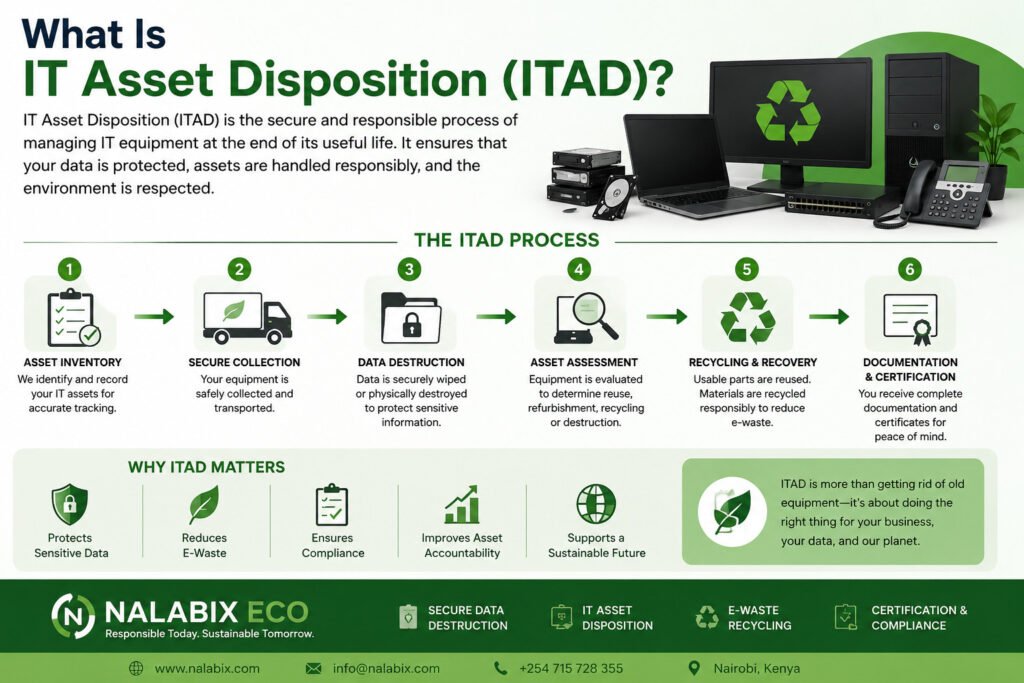
Every business eventually has IT equipment that is no longer needed. Computers are replaced, servers are upgraded, hard drives become obsolete, and office equipment reaches the end of its useful life. But what happens next? Simply throwing old equipment away can expose a business to data security, environmental, and compliance risks. IT Asset Disposition (ITAD) provides a structured way to manage retired technology securely and responsibly. What Happens During the ITAD Process? A professional ITAD process generally follows several important stages. 1. Asset Inventory The first step is identifying the equipment being retired. This may include computers, laptops, servers, hard drives, SSDs, printers, networking equipment, and other IT assets. Asset tags, serial numbers, quantities, and equipment condition can be recorded for accountability. 2. Secure Collection Equipment is collected and handled in a controlled manner to reduce the risk of loss, theft, or unauthorized access—particularly when devices still contain data. 3. Data Destruction Before equipment is reused, recycled, or disposed of, data-bearing devices should be securely sanitized or physically destroyed according to the organization’s requirements. 4. Asset Assessment Equipment is assessed to determine the most appropriate next step. Depending on its condition and requirements, an asset may be suitable for reuse, refurbishment, recycling, or destruction. 5. Recycling and Final Disposition Equipment that has reached the end of its useful life is processed through responsible e-waste recycling channels. Different materials and components can be separated and directed to appropriate recovery processes. 6. Documentation and Certification The final stage provides an auditable record of what was done with the equipment. Certificates and supporting documentation can help businesses demonstrate that their retired IT assets were handled responsibly. ITAD vs. Simply Disposing of Old IT Equipment There is a major difference between ITAD and ordinary disposal. Ordinary Disposal IT Asset Disposition Focuses mainly on getting rid of equipment Manages the entire disposition process Data security may be overlooked Data destruction is a key consideration Limited asset tracking Assets can be tracked and documented May contribute to improper e-waste disposal Promotes responsible recycling Little or no supporting documentation Provides records and certification ITAD treats retired technology as an asset that needs to be securely managed, not simply thrown away. Why Does ITAD Matter? Retired IT equipment can contain much more than outdated technology. A single computer, server, or storage device may still contain passwords, customer information, financial records, business documents, or other confidential data. At the same time, electronic equipment contains materials that should not end up in ordinary waste streams. 1. Protects Sensitive Business Data ITAD includes appropriate data sanitization or physical destruction methods to ensure information stored on retired devices cannot be improperly accessed. 2. Reduces E-Waste TAD directs obsolete equipment into appropriate recycling and recovery processes, helping keep electronic waste out of landfills and supporting the recovery of valuable materials. 3. Creates Asset Accountability Businesses need to know what happened to their equipment after it left their premises. An effective ITAD process can track assets through key stages, creating a clear record of collection, data destruction, recycling, and final disposition. 4. Provides Documentation For many organizations, responsible disposal is not complete without evidence. Depending on the service provided, ITAD documentation may include collection records, asset inventories, data destruction records, recycling documentation, and certificates of destruction or recycling. Who Needs ITAD Services? ITAD can benefit organizations that regularly retire or replace technology, including: It is particularly valuable for organizations handling large quantities of equipment or sensitive information. IT Asset Disposition in Kenya As businesses in Kenya continue to adopt new technologies, the volume of retired electronic equipment is also growing. A responsible ITAD approach helps organizations manage this equipment while addressing two important priorities: data security and responsible e-waste management. For businesses replacing computers, upgrading servers, clearing office equipment, or decommissioning IT infrastructure, having a documented disposition process can provide greater control and peace of mind. How Nalabix Eco Supports ITAD Nalabix Eco provides businesses in Kenya with responsible IT asset disposition solutions covering secure collection, data destruction, e-waste recycling, documentation, and certification. We help organizations move beyond simply getting rid of obsolete equipment by ensuring retired IT assets are handled through a structured and responsible process. Our services can help businesses: The Bottom Line IT Asset Disposition is not simply about disposing of old computers. It is about managing retired technology securely, responsibly, and transparently. A well-managed ITAD process helps protect sensitive information, reduce e-waste, improve asset accountability, and provide businesses with documentation of what happened to their equipment. For organizations in Kenya, partnering with a responsible ITAD and e-waste management provider can make the transition from retired technology to secure final disposition much safer and more sustainable. Nalabix Eco — responsible IT asset disposition, secure data destruction, and e-waste recycling for businesses in Kenya.
Why Certificates of Data Destruction Matter
When a business disposes of computers, hard drives, servers, laptops, or other data-bearing devices, simply deleting files is not enough. Sensitive information can remain on storage devices even after a device is no longer in use. A Certificate of Data Destruction provides documented evidence that data was securely destroyed and that the device was handled through a controlled disposal process. What Is a Certificate of Data Destruction? A Certificate of Data Destruction is an official record confirming that data stored on a device has been securely destroyed using an approved method. Depending on the process used, data may be destroyed through secure data wiping, degaussing where appropriate, or physical destruction of the storage media. A certificate typically records details such as: This creates a clear record of what happened to each data-bearing asset. Why Does the Certificate Matter? 1. It Provides Proof of Secure Data Destruction Businesses need more than an assurance that data was destroyed. A certificate provides written evidence that the destruction actually took place. This is particularly important when disposing of large numbers of computers, hard drives, SSDs, servers, or other IT equipment. 2. It Reduces Data Security Risks Old devices can contain confidential information such as customer records, employee details, financial information, passwords, and business documents. A documented destruction process helps organizations reduce the risk of sensitive information being recovered from retired equipment. 3. It Supports Compliance and Audits Organizations may need to demonstrate how they manage sensitive information throughout its lifecycle. A Certificate of Data Destruction can support internal audits, compliance reviews, information security procedures, and corporate governance by creating an auditable record of disposal. 4. It Creates Accountability Without proper documentation, it can be difficult to establish what happened to an old device after it left an organization’s premises. Certificates create a traceable record from collection to destruction, helping businesses maintain accountability for their IT assets. 5. It Protects Your Business Reputation A data breach involving improperly disposed equipment can result in financial losses, operational disruption, and damage to customer trust. Secure destruction supported by proper documentation demonstrates that data protection remains a priority even when equipment reaches the end of its useful life. What Should a Good Certificate Include? A useful certificate should contain enough information to connect the destruction process to the specific assets involved. At minimum, organizations should look for: Asset identification: Serial numbers, asset tags, or other unique identifiers. Destruction method: A clear description of how the data was destroyed. Date of destruction: When the destruction was completed. Service provider details: The organization responsible for carrying out the process. Authorization: Name and signature of the responsible representative. For larger projects, supporting documentation such as asset lists, collection records, photographs, or destruction reports can provide an additional audit trail. Data Destruction Is More Than Deleting Files Deleting files or performing a quick format does not necessarily make information unrecoverable. Businesses should use an appropriate sanitization method based on the type of storage device, security requirements, and intended end-of-life treatment. For devices that will be reused, secure data wiping may be appropriate. Where devices are being permanently retired, physical destruction may provide a suitable solution depending on the organization’s requirements. The important point is to match the destruction method to the risk and the device. Secure Data Destruction with Nalabix Eco At Nalabix Eco, we help businesses manage end-of-life IT equipment through secure data destruction and responsible e-waste management. Our process can include the identification and handling of data-bearing devices, secure destruction, responsible recycling, and documentation to help clients maintain a clear record of their assets. A Certificate of Data Destruction is not just a piece of paper. It is evidence, accountability, and an important part of responsible IT asset disposal. When sensitive data is involved, don’t leave disposal to chance. Make sure destruction is properly carried out—and properly documented. Nalabix Eco — Secure Data Destruction. Responsible E-Waste Management.
NIST Data Sanitization Standards Explained
When a computer, hard drive, SSD, or other data-bearing device reaches the end of its useful life, deleting files is not enough. Data can remain accessible even after files are removed or a device is reset. This is where NIST data sanitization standards come in. They provide organizations with a structured approach to making sensitive information inaccessible before devices are reused, recycled, or destroyed. What Is NIST Data Sanitization? NIST data sanitization refers to processes recommended by the National Institute of Standards and Technology (NIST) for removing data from storage devices so that it cannot be reasonably accessed or recovered. The widely referenced standard is NIST SP 800-88, Guidelines for Media Sanitization. It helps organizations choose an appropriate method based on the type of storage media, sensitivity of the information, and intended disposition of the device. The Three NIST Sanitization Methods NIST SP 800-88 identifies three main sanitization methods: 1. Clear Clear uses logical techniques to remove data while generally allowing the storage device to continue being used. For example, appropriate overwriting or device-specific commands may be used depending on the technology. This method can be suitable when the device will remain within a controlled environment and the data does not require a higher level of protection. 2. Purge Purge uses more advanced techniques to make data recovery significantly more difficult, while potentially allowing the device to remain reusable. Examples may include approved cryptographic techniques or device-specific sanitization commands. Purge can be useful when sensitive information needs stronger protection before equipment is reused or transferred. 3. Destroy Destroy physically destroys the storage media so that data recovery is no longer feasible. Depending on the device, this may involve shredding, crushing, disintegration, or other appropriate physical destruction methods. For end-of-life drives that cannot be reliably sanitized through logical methods, physical destruction may be the most appropriate option. Why NIST Data Sanitization Matters Improper disposal of data-bearing devices can expose organizations to serious risks, including: Simply deleting files, formatting a drive, or performing a factory reset should not automatically be treated as secure data sanitization. NIST Sanitization and SSDs Modern storage technologies require careful consideration. SSDs and flash-based devices operate differently from traditional hard disk drives because of features such as wear leveling and over-provisioning. As a result, traditional overwriting methods may not always provide the same assurance as they do with conventional magnetic hard drives. Organizations should therefore select a sanitization method appropriate to the specific media and follow recognized guidance. Why Documentation Matters Secure data sanitization should not only focus on the technical process. Documentation and verification are equally important. A proper process should maintain records such as: A Certificate of Data Destruction or Sanitization can provide useful evidence that the required process was completed. How Nalabix Eco Helps At Nalabix Eco, we help organizations in Kenya manage end-of-life IT equipment responsibly while protecting information stored on data-bearing devices. Our secure data destruction services can include NIST-aligned data sanitization and physical destruction, depending on the device, data sensitivity, and client requirements. We also support proper documentation and certification to help organizations maintain an accountable disposal process. Final Thoughts NIST data sanitization provides organizations with a practical framework for protecting information when storage devices are reused, transferred, recycled, or retired. The key lesson is simple: deleting data is not the same as securely sanitizing it. By choosing the right sanitization method, documenting the process, and working with a qualified service provider, organizations can reduce data security risks while ensuring responsible IT asset disposal. Nalabix Eco — Secure Data Destruction. Responsible E-Waste Recycling.
Certified Data Destruction Explained
When businesses dispose of computers, hard drives, servers, laptops, and other IT equipment, simply deleting files is not enough. Data can remain recoverable even after a device appears empty. Certified data destruction provides a secure and documented way to permanently eliminate sensitive information from data-bearing devices while creating evidence that the destruction was completed. What Is Certified Data Destruction? Certified data destruction is the process of securely destroying or permanently erasing data from storage devices and providing documentation to verify that the process was completed. Depending on the device and security requirements, data may be destroyed through: The goal is not simply to make the device unusable—it is to ensure that the information stored on it cannot be accessed or reconstructed. Why Is Data Destruction Certification Important? A certificate provides businesses with a documented record of what happened to their data-bearing equipment. This can help organizations: Protect Sensitive Information Old devices may contain customer records, employee information, financial documents, passwords, emails, and business data. Secure destruction reduces the risk of this information falling into the wrong hands. Demonstrate Accountability A certificate creates a clear record showing that specific devices were processed and their data was securely destroyed. Support Compliance Organizations may have legal, regulatory, contractual, or internal data-protection requirements. Documented destruction can help demonstrate that appropriate disposal procedures were followed. Strengthen IT Asset Disposal Data destruction should be part of a complete IT Asset Disposition (ITAD) process. Devices can be tracked from collection through data destruction, recycling, and final documentation. What Does a Data Destruction Certificate Include? A professional certificate should provide enough information to identify the completed destruction activity. Depending on the service, this may include: This documentation gives organizations a traceable record rather than relying on a verbal confirmation. Data Wiping vs. Physical Destruction Not every device needs to be physically destroyed. Secure data wiping may be appropriate when equipment will be reused or refurbished and the storage media remains functional. Physical destruction is generally preferred when a storage device is damaged, obsolete, no longer required, or when the organization requires the media to be rendered physically unusable. The appropriate method depends on the device, its condition, the sensitivity of the information, and the organization’s security requirements. What Happens After Destruction? Data destruction is only one part of responsible IT equipment disposal. Once data-bearing devices have been securely processed, remaining electronic equipment can be directed into appropriate e-waste recycling and recovery channels. Materials such as metals, plastics, and other components can be recovered where suitable instead of being improperly disposed of. This connects data security with environmental responsibility. Choose a Documented Data Destruction Process Secure disposal should leave no uncertainty about what happened to your organization’s data. Whether you require secure wiping, physical destruction, on-site services, or documented IT asset disposal, a structured process helps protect sensitive information while supporting responsible e-waste management. Nalabix provides secure data destruction and e-waste management services in Kenya, helping organizations manage data-bearing devices responsibly from collection and destruction through recycling and certification. Final Takeaway Certified data destruction is more than deleting files or throwing away old equipment. It combines secure data removal, controlled handling, physical destruction where required, documentation, and responsible recycling. For businesses, the certificate provides something valuable: proof that sensitive data was securely destroyed and the disposal process was properly documented.
Data Breaches Caused by Improper Device Disposal
When a computer, hard drive, laptop, server, or other electronic device reaches the end of its useful life, many organizations focus on getting rid of the physical equipment. But there is another important question: What happens to the data stored on it? Improper device disposal can expose confidential information long after a device leaves the office. Simply deleting files or formatting a drive does not always remove the data permanently. If storage devices are discarded, resold, donated, or recycled without proper data destruction, sensitive information can potentially be recovered. How Improper Disposal Can Cause a Data Breach A data breach can happen when an old device containing recoverable information falls into the wrong hands. Devices such as: may contain customer records, employee information, financial documents, passwords, business files, or other confidential data. If the information has not been securely erased or physically destroyed, someone with the right tools and knowledge may be able to recover it. Why Deleting Files Is Not Enough One of the most common mistakes is assuming that deleting a file means it is gone forever. In many cases, deleting files only removes the references that allow the operating system to locate them. The underlying information may remain on the storage media until it is overwritten or otherwise securely destroyed. Even a factory reset or standard formatting may not provide the level of protection required for sensitive business information. That is why organizations should use a verified data destruction process before disposing of data-bearing devices. The Risks to Businesses Improper disposal can expose businesses to several risks, including: 1. Loss of Confidential Information Customer details, employee records, financial information, and internal documents may become accessible to unauthorized individuals. 2. Financial Loss A data breach can result in investigation costs, operational disruption, legal expenses, and potential financial penalties. 3. Damage to Reputation Customers and business partners expect organizations to protect their information. A preventable breach can seriously affect trust. 4. Compliance Problems Organizations may have legal, regulatory, contractual, or internal requirements for protecting and securely disposing of information. 5. Competitive Risk Old devices may contain business strategies, intellectual property, passwords, customer databases, or other commercially sensitive information. How Businesses Can Prevent Disposal-Related Data Breaches Secure disposal should be treated as part of the data security lifecycle—not as an afterthought. A good process includes: 1. Identify data-bearing devicesKnow which equipment contains storage media and track each device through the disposal process. 2. Choose the appropriate destruction methodDepending on the device and security requirements, this may involve secure data wiping or physical destruction. 3. Use a controlled disposal processDevices should be securely collected, transported, handled, and processed to reduce the risk of loss or unauthorized access. 4. Keep recordsMaintain documentation showing what was processed, when it was handled, and how the data was destroyed. 5. Obtain a Certificate of DestructionA certificate provides documented evidence that data-bearing devices were processed according to the agreed destruction requirements. Secure Disposal Protects More Than Hardware Responsible IT asset disposal is not simply about removing unwanted equipment from an office. It is about protecting the information that remains on those devices while ensuring the equipment is handled responsibly. For organizations in Kenya, working with a professional e-waste and data destruction provider can help create a secure chain of custody from collection through final destruction or recycling. Final Word An old device can still contain valuable data. Throwing it away, selling it, or sending it for recycling without proper data destruction can create a serious security risk. Before any computer, hard drive, server, or other data-bearing device leaves your organization, make sure the information stored on it has been securely destroyed and that the process is properly documented.
Best Practices for Secure IT Asset Disposal
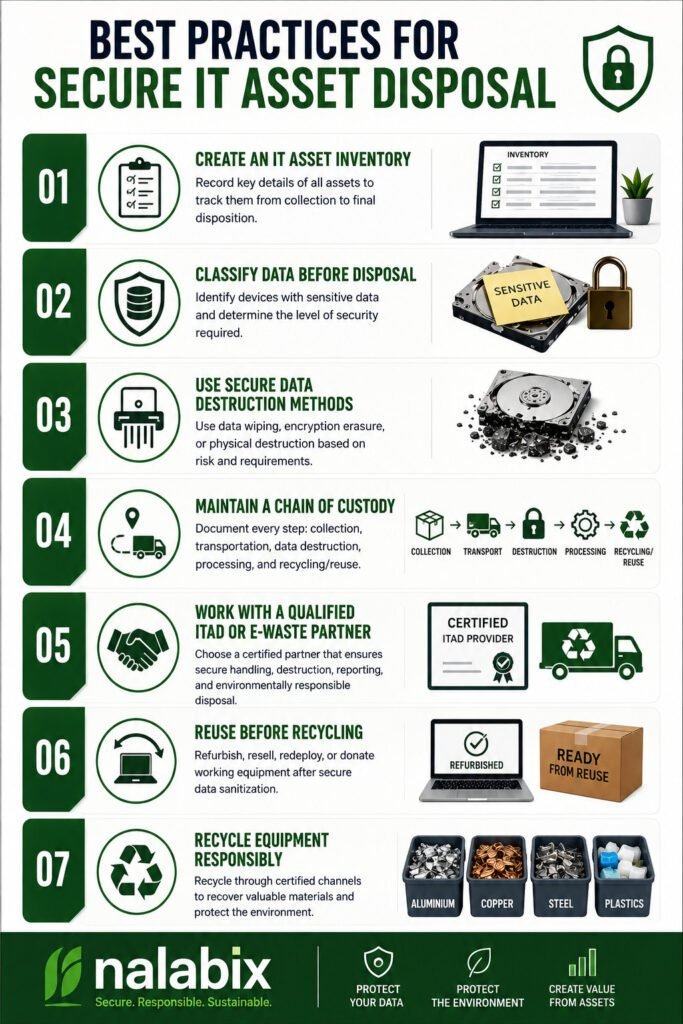
When computers, servers, hard drives, laptops, and other IT equipment reach the end of their useful life, simply throwing them away is not enough. These devices may still contain confidential business information, customer records, passwords, financial data, and other sensitive information. Secure IT asset disposal ensures that old equipment is handled responsibly while protecting data, meeting compliance requirements, and supporting environmentally responsible recycling. Best Practices for Secure IT Asset Disposal 1. Create an IT Asset Inventory Before disposing of equipment, identify what you have. Record details such as: A proper inventory creates accountability and makes it easier to track every asset from collection to final disposition. 2. Classify Data Before Disposal Not every device carries the same level of risk. Identify equipment that may contain sensitive information, including: High-risk devices should receive an appropriate level of data destruction before they are reused, recycled, or disposed of. 3. Use Secure Data Destruction Methods Deleting files or performing a quick factory reset does not always provide sufficient protection. Depending on the device and security requirements, organizations can use methods such as: For organizations following recognized data-security practices, methods aligned with NIST SP 800-88 can provide a structured approach to media sanitization. 4. Maintain a Chain of Custody Data security should not stop when equipment leaves your office. Maintain records showing: Collection → Transportation → Data Destruction → Processing → Recycling/Reuse A documented chain of custody helps organizations know where their assets are at every stage and reduces the risk of loss, theft, or unauthorized access. 5. Work With a Qualified ITAD or E-Waste Partner Choosing the right disposal provider is one of the most important steps. Look for a provider that can demonstrate: A reputable provider should be able to explain exactly what happens to your equipment after collection. 6. Reuse Before Recycling Not every old device needs to be destroyed. Equipment that is still functional may be suitable for refurbishment, resale, redeployment, or donation after secure data sanitization. Extending the useful life of equipment reduces electronic waste and helps recover value from technology that still has practical use. 7. Recycle Equipment Responsibly Devices that cannot be reused should be processed through responsible e-waste recycling channels. Computers and electronics contain recoverable materials such as aluminium, copper, steel, and other valuable components, but they may also contain substances that require controlled handling. Responsible recycling helps prevent electronic waste from ending up in uncontrolled dumpsites or informal processing environments. Why Certificates and Documentation Matter A secure IT asset disposal process should leave an audit trail. Depending on the service provided, organizations may receive documents such as: These records provide evidence that equipment was handled according to the agreed disposal process and can be valuable for internal audits, compliance, and corporate governance. Common IT Disposal Mistakes to Avoid Avoid these common practices: Simply deleting files: Deleted files may remain recoverable. Throwing computers in general waste: This creates data-security and environmental risks. Removing the hard drive and ignoring the rest: Other devices may contain storage components or sensitive information. Using an unverified disposal company: You may lose visibility of what happens to your equipment. Failing to keep records: Without documentation, it can be difficult to prove how assets were handled. A Secure Disposal Process Is More Than Getting Rid of Old Equipment Secure IT asset disposal combines data protection, asset management, compliance, value recovery, and environmental responsibility. For businesses, the goal should not simply be to remove unwanted computers and electronics from the workplace. The goal is to ensure that every asset is securely tracked, data is properly destroyed or sanitized, reusable equipment is recovered, and e-waste is responsibly recycled. By following these best practices and working with a qualified ITAD or e-waste management provider, organizations can reduce data-security risks while making their technology disposal process more responsible and accountable. Secure Your IT Asset Disposal With Nalabix Nalabix provides secure IT asset disposal, data destruction, IT asset disposition, e-waste collection, and responsible electronics recycling services in Kenya. Our approach helps businesses protect sensitive information while ensuring end-of-life equipment is handled responsibly.
Hard Drive Destruction vs Data Wiping: Which Is More Secure?
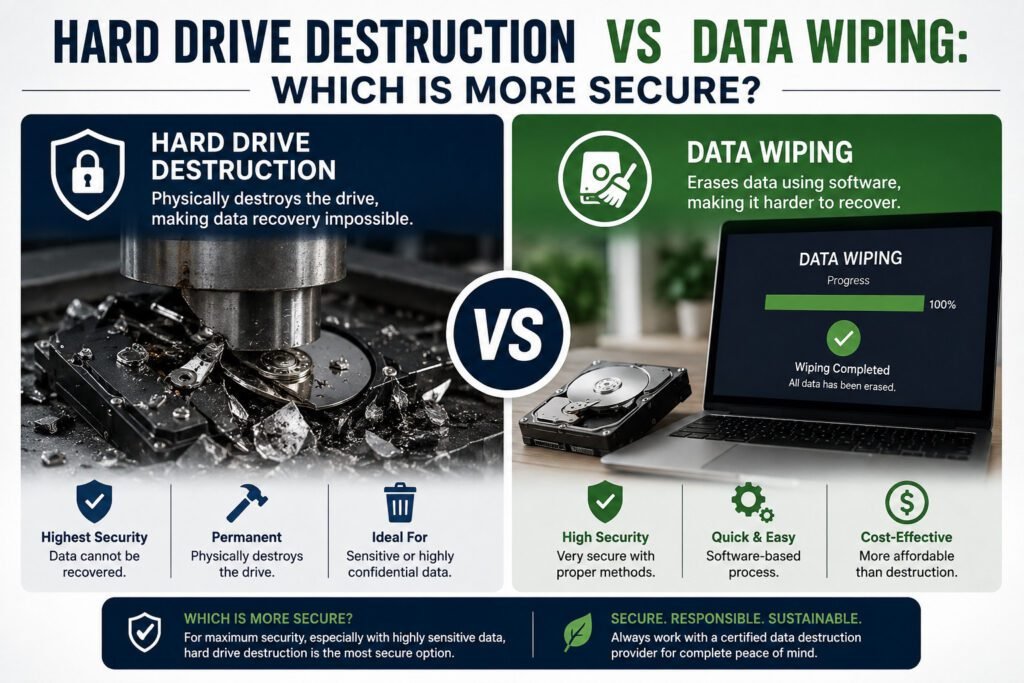
When a computer, server, or storage device reaches the end of its useful life, simply deleting files is not enough. Sensitive information can remain on a hard drive even after files are removed or a device is reset. For businesses, the key question is: Should you wipe the data or physically destroy the hard drive? Both methods can protect information, but they serve different purposes. What Is Data Wiping? Data wiping is the process of securely removing information from a storage device so that it cannot be recovered using normal data recovery methods. Unlike simply deleting files or formatting a drive, secure wiping overwrites the data according to an established sanitization method. For example, we use recognized data sanitization procedures such as NIST SP 800-88 to determine the appropriate method for different types of storage media. When is data wiping useful? Data wiping is often suitable when: The major advantage is that the storage device remains usable after successful sanitization. What Is Hard Drive Destruction? Hard drive destruction involves physically damaging or dismantling a storage device so that the data stored on it cannot be practically accessed. Depending on the process, this may involve shredding, crushing, drilling, cutting, or dismantling the drive. Once properly destroyed, the drive is no longer suitable for normal use. When is destruction the better option? Physical destruction may be appropriate when: For particularly sensitive information, physical destruction provides a clear final step in the disposal process. Hard Drive Destruction vs Data Wiping Feature Data Wiping Hard Drive Destruction Data removed Yes Yes Drive remains usable Usually No Suitable for reuse ✅ Yes ❌ No Suitable for end-of-life drives ✅ Sometimes ✅ Yes Physical damage No Yes Best for Reuse and redeployment Permanent disposal Verification Can be documented Can be documented Which Method Should You Choose? The right method depends on what happens to the device after data removal. If the computer or hard drive will be reused, sold, refurbished, or redeployed, secure data wiping is generally the more practical option. If the device is damaged, obsolete, or being permanently retired, physical destruction may provide a stronger final assurance that the data cannot be recovered. In some cases, organizations may use a combination of processes—for example, securely wiping usable devices while physically destroying storage media that cannot be trusted or reused. Why Businesses Need Proof of Data Destruction For businesses, securely removing data is only part of the process. Documentation matters too. A professional data destruction process should provide evidence of what happened to the storage device. Depending on the method used, this may include: This creates an audit trail and helps organizations demonstrate responsible handling of sensitive information. The Bottom Line Data wiping and hard drive destruction are not competing solutions—they are tools for different situations. Choose data wiping when the storage device needs to remain operational. Choose physical destruction when the device is being permanently retired or the risks associated with the data require a final physical barrier. The most important thing is not simply throwing away a hard drive. It is ensuring the information stored on it cannot fall into the wrong hands. Need Secure Data Destruction in Kenya? Nalabix provides professional data destruction and IT asset disposal services in Kenya, helping businesses securely handle end-of-life computers, hard drives, SSDs and other electronic equipment. Whether you need secure data wiping, physical drive destruction, or documented IT asset disposal, using a professional process helps protect your data while supporting responsible e-waste management.
What Happens to Your Data After You Throw Away a Computer?
Most people think that once an old computer is deleted, formatted, or thrown away, the information inside it is gone. That is not always true. Your old computer may still contain emails, documents, passwords, financial records, customer information, photographs, and other sensitive data. Even when the computer no longer turns on, the storage device inside it may still hold valuable information. So, what really happens to your data after you throw away a computer? Your Data Doesn’t Disappear When You Delete It When you delete a file, the computer often removes the reference to that file rather than immediately destroying the information itself. The same applies to many traditional formatting methods. Until the storage space is properly overwritten, sanitized, or the storage device is physically destroyed, information may remain recoverable using specialized tools. This creates an important distinction: Deleting data is not the same as securely destroying data. That difference matters even more when a computer contains confidential business or personal information. What Happens When an Old Computer Leaves Your Hands? Once you dispose of a computer, you may no longer know where it goes or who handles it. Depending on its condition, the computer could be: → Refurbished → Resold → Donated → Dismantled → Recycled Reusing equipment is generally positive because it extends the life of electronics and supports a circular economy. The problem occurs when the device changes hands without its data being properly secured first. A refurbished laptop, for example, may be given to a new user. If its previous owner’s information was never properly sanitized, sensitive files could potentially be recovered. What Information Could Still Be on the Computer? An old computer can contain much more information than you may realize. Depending on how the device was used, it could contain: For organizations, an improperly disposed computer can therefore become a data security risk, not simply an e-waste problem. What If the Computer No Longer Works? A broken computer is not automatically a safe computer. In fact, a faulty laptop or desktop may still have a perfectly readable hard drive or SSD. The screen may be broken. The motherboard may have failed. The computer may not power on at all. But the storage device could still contain the information that was stored on it. This is why organizations should treat the storage media separately from the physical condition of the computer. Broken does not mean data-free. What Happens to Computers in the E-Waste Stream? When computers enter the e-waste stream, they may be collected for reuse, refurbishment, dismantling or recycling. During responsible e-waste processing, valuable materials such as aluminium, copper, steel, plastics and electronic components can be recovered. However, storage devices require additional attention. Before a computer is resold, refurbished or recycled, its data should be securely handled according to the required level of protection. Depending on the device and sensitivity of the information, this can involve secure data erasure, cryptographic sanitization, or physical destruction. The goal is simple: Protect the information first. Recover the materials second. Why Businesses Should Take This Seriously For businesses, computer disposal is part of information security. Imagine an organization replacing 50 office computers. If those machines are simply handed to a collector without proper data destruction, the organization could unknowingly release years of confidential information. This may include: That is why professional IT Asset Disposition (ITAD) goes beyond collecting old equipment. A proper process should account for the equipment, the data stored on it, its final destination, and the documentation required to demonstrate responsible disposal. How Is Data Securely Destroyed? The appropriate method depends on the type of storage device and the sensitivity of the information. 1. Secure Data Erasure Specialized software can sanitize a drive so that previously stored information cannot be practically recovered. For organizations, methods aligned with recognized standards such as NIST SP 800-88 can provide a structured approach to media sanitization. 2. Physical Destruction Where data must not be recoverable, storage media can be physically destroyed using appropriate equipment and controlled procedures. This can include hard drive or SSD destruction, followed by responsible recycling of the resulting materials. 3. Verification and Documentation Secure destruction should not end with the physical process. Organizations may also require records showing: This creates an auditable record of what happened to the organization’s data-bearing assets. What Should You Do Before Throwing Away a Computer? Before disposing of an old computer, don’t simply delete your files and put it outside. Instead: Back up → Remove accounts → Securely sanitize data → Verify destruction → Recycle responsibly For businesses handling confidential information, it is advisable to use a documented data destruction process and work with a qualified e-waste or ITAD provider. The Bigger Picture: Data Security and E-Waste Management Computer disposal is no longer just an environmental issue. It is also a data security issue. Every computer reaching the end of its useful life has two questions attached to it: What happens to the device? and What happens to the information stored on it? Responsible disposal answers both. The equipment can be refurbished where possible, valuable materials can be recovered through recycling, and sensitive information can be securely destroyed before the device leaves your control. Final Takeaway Throwing away a computer does not automatically make the data inside it disappear. Whether the computer is sold, donated, refurbished, dismantled or recycled, its storage device may still contain information that should never fall into the wrong hands. Before you dispose of the hardware, secure the data. For businesses, a professional ITAD and e-waste management process provides a safer approach—combining data destruction, asset tracking, responsible recycling, and proper documentation. Looking for Secure Data Destruction and E-Waste Recycling in Kenya? Nalabix helps businesses responsibly manage end-of-life computers, IT equipment and data-bearing devices through secure data destruction, IT asset disposition and e-waste recycling services in Kenya. The objective is simple: protect your data, recover value from your equipment, and dispose of electronics responsibly.
Why Data Destruction Matters:
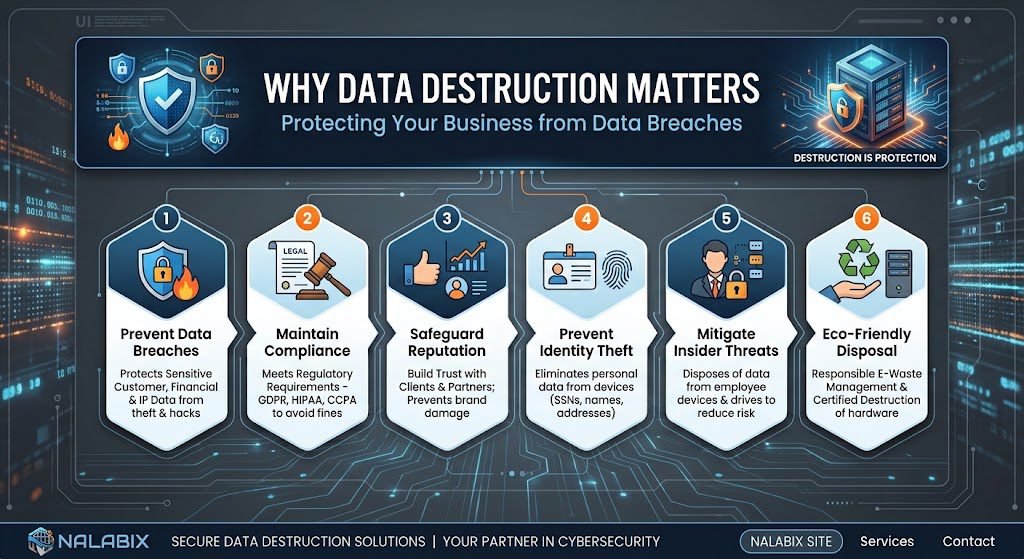
When a computer, hard drive, server or laptop reaches the end of its useful life, many businesses focus on disposing of the hardware. But there is something far more valuable inside that equipment: data. Old devices can contain customer records, financial information, employee details, passwords, emails and confidential business files. Simply deleting these files does not necessarily make them disappear. This is why secure data destruction is an essential part of responsible IT asset disposal. What Is Data Destruction? Data destruction is the process of permanently removing information from electronic storage devices so that it cannot be accessed or recovered. Depending on the type of device and the sensitivity of the information, data can be destroyed through: The objective is simple: ensure sensitive information does not fall into the wrong hands. Why Is Data Destruction Important? 2. Reduces the Risk of Data Breaches Improperly disposed IT equipment can create an unexpected security risk. A discarded hard drive could potentially expose sensitive information if it has not been properly wiped or destroyed. This can lead to financial losses, reputational damage and loss of customer trust. Secure data destruction closes this gap in the IT asset lifecycle. 📋 3. Provides Proof of Responsible Disposal Businesses should be able to demonstrate what happened to their retired IT equipment. A professional data destruction service can provide documentation such as a Certificate of Destruction, recording that the data-bearing device was securely processed. This creates accountability and helps businesses maintain proper internal and compliance records. 🏢 4. Protects Your Company’s Reputation Customers trust businesses with their information. If a retired laptop or hard drive ends up exposing customer data, the consequences can extend far beyond the device itself. It can damage the reputation that a business has spent years building. Secure data destruction shows customers, employees and business partners that information security remains a priority—even when equipment is being retired. Is Deleting Files Enough? No. Deleting a file or formatting a drive is not the same as securely destroying the data. Depending on the storage device and method used, deleted information may still be recoverable using specialized software or techniques. For sensitive information, businesses should use a verified data destruction method appropriate to the device and security requirements. Data Destruction and E-Waste Recycling Data security and e-waste recycling should work together. Once data has been securely removed, suitable equipment can be reused, refurbished or recycled instead of being unnecessarily sent to landfill. For example, a company replacing 100 office computers could have the devices collected, sensitive data securely wiped or storage media destroyed, and the remaining equipment assessed for reuse or responsible recycling. This approach protects both digital information and the physical environment. Data Destruction in Kenya As organizations across Kenya upgrade computers, servers, storage devices and other IT equipment, secure end-of-life management is becoming increasingly important. Businesses should choose professional data destruction and IT asset disposal services in Kenya that can: This is particularly important for organizations handling large volumes of sensitive information, including financial institutions, healthcare organizations, government agencies, educational institutions and technology companies. What Should Businesses Do With Old Hard Drives? Do not simply throw them in general waste or hand them over without knowing how the data will be handled. Instead, businesses should: Identify → Secure → Destroy → Document → Recycle This creates a clear chain of responsibility from the moment equipment is retired to its final destination. The Bottom Line Data destruction matters because getting rid of a device does not automatically get rid of the information stored on it. Whether you are replacing a single office computer or decommissioning an entire data centre, secure data destruction helps protect confidential information, reduce security risks and support responsible IT asset disposal. At the same time, properly processed equipment can be reused or recycled, helping businesses in Kenya move towards a more sustainable circular economy. Your data may be digital, but the risk of improper disposal is very real. Protect it until the very end of the device’s lifecycle.