
Data Breaches Caused by Improper Device Disposal
When a computer, hard drive, laptop, server, or other electronic device reaches the end of its useful life, many organizations focus on getting rid of the physical equipment. But there is another important question: What happens to the data stored on it? Improper device disposal can expose confidential information long after a device leaves the office. Simply deleting files or formatting a drive does not always remove the data permanently. If storage devices are discarded, resold, donated, or recycled without proper data destruction, sensitive information can potentially be recovered. How Improper Disposal Can Cause a Data Breach A data breach can happen when an old device containing recoverable information falls into the wrong hands. Devices such as: may contain customer records, employee information, financial documents, passwords, business files, or other confidential data. If the information has not been securely erased or physically destroyed, someone with the right tools and knowledge may be able to recover it. Why Deleting Files Is Not Enough One of the most common mistakes is assuming that deleting a file means it is gone forever. In many cases, deleting files only removes the references that allow the operating system to locate them. The underlying information may remain on the storage media until it is overwritten or otherwise securely destroyed. Even a factory reset or standard formatting may not provide the level of protection required for sensitive business information. That is why organizations should use a verified data destruction process before disposing of data-bearing devices. The Risks to Businesses Improper disposal can expose businesses to several risks, including: 1. Loss of Confidential Information Customer details, employee records, financial information, and internal documents may become accessible to unauthorized individuals. 2. Financial Loss A data breach can result in investigation costs, operational disruption, legal expenses, and potential financial penalties. 3. Damage to Reputation Customers and business partners expect organizations to protect their information. A preventable breach can seriously affect trust. 4. Compliance Problems Organizations may have legal, regulatory, contractual, or internal requirements for protecting and securely disposing of information. 5. Competitive Risk Old devices may contain business strategies, intellectual property, passwords, customer databases, or other commercially sensitive information. How Businesses Can Prevent Disposal-Related Data Breaches Secure disposal should be treated as part of the data security lifecycle—not as an afterthought. A good process includes: 1. Identify data-bearing devicesKnow which equipment contains storage media and track each device through the disposal process. 2. Choose the appropriate destruction methodDepending on the device and security requirements, this may involve secure data wiping or physical destruction. 3. Use a controlled disposal processDevices should be securely collected, transported, handled, and processed to reduce the risk of loss or unauthorized access. 4. Keep recordsMaintain documentation showing what was processed, when it was handled, and how the data was destroyed. 5. Obtain a Certificate of DestructionA certificate provides documented evidence that data-bearing devices were processed according to the agreed destruction requirements. Secure Disposal Protects More Than Hardware Responsible IT asset disposal is not simply about removing unwanted equipment from an office. It is about protecting the information that remains on those devices while ensuring the equipment is handled responsibly. For organizations in Kenya, working with a professional e-waste and data destruction provider can help create a secure chain of custody from collection through final destruction or recycling. Final Word An old device can still contain valuable data. Throwing it away, selling it, or sending it for recycling without proper data destruction can create a serious security risk. Before any computer, hard drive, server, or other data-bearing device leaves your organization, make sure the information stored on it has been securely destroyed and that the process is properly documented.
Best Practices for Secure IT Asset Disposal
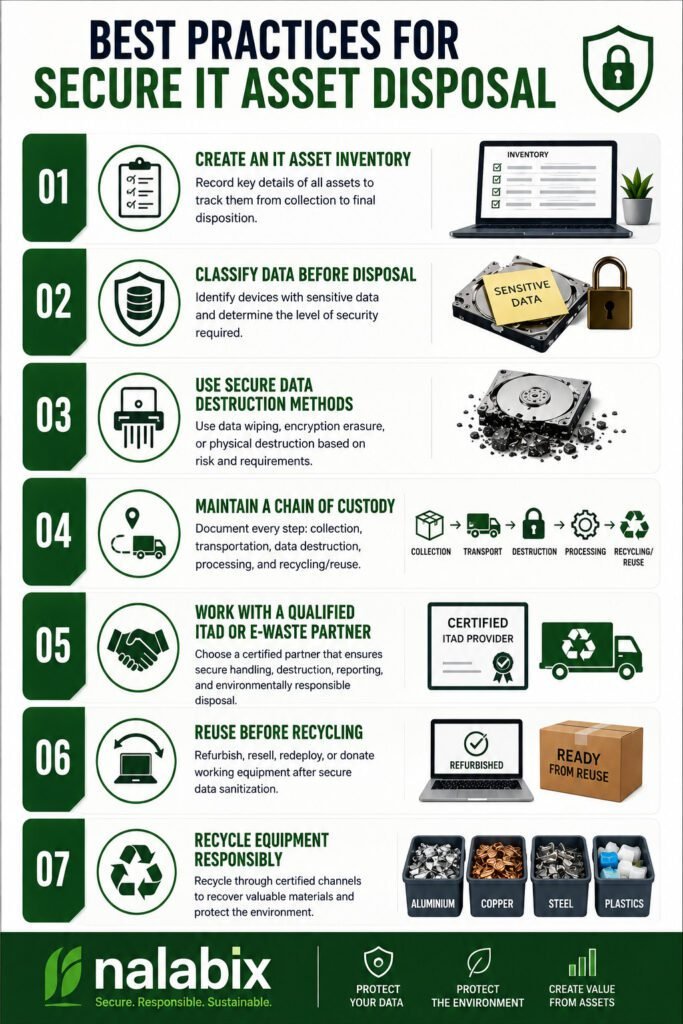
When computers, servers, hard drives, laptops, and other IT equipment reach the end of their useful life, simply throwing them away is not enough. These devices may still contain confidential business information, customer records, passwords, financial data, and other sensitive information. Secure IT asset disposal ensures that old equipment is handled responsibly while protecting data, meeting compliance requirements, and supporting environmentally responsible recycling. Best Practices for Secure IT Asset Disposal 1. Create an IT Asset Inventory Before disposing of equipment, identify what you have. Record details such as: A proper inventory creates accountability and makes it easier to track every asset from collection to final disposition. 2. Classify Data Before Disposal Not every device carries the same level of risk. Identify equipment that may contain sensitive information, including: High-risk devices should receive an appropriate level of data destruction before they are reused, recycled, or disposed of. 3. Use Secure Data Destruction Methods Deleting files or performing a quick factory reset does not always provide sufficient protection. Depending on the device and security requirements, organizations can use methods such as: For organizations following recognized data-security practices, methods aligned with NIST SP 800-88 can provide a structured approach to media sanitization. 4. Maintain a Chain of Custody Data security should not stop when equipment leaves your office. Maintain records showing: Collection → Transportation → Data Destruction → Processing → Recycling/Reuse A documented chain of custody helps organizations know where their assets are at every stage and reduces the risk of loss, theft, or unauthorized access. 5. Work With a Qualified ITAD or E-Waste Partner Choosing the right disposal provider is one of the most important steps. Look for a provider that can demonstrate: A reputable provider should be able to explain exactly what happens to your equipment after collection. 6. Reuse Before Recycling Not every old device needs to be destroyed. Equipment that is still functional may be suitable for refurbishment, resale, redeployment, or donation after secure data sanitization. Extending the useful life of equipment reduces electronic waste and helps recover value from technology that still has practical use. 7. Recycle Equipment Responsibly Devices that cannot be reused should be processed through responsible e-waste recycling channels. Computers and electronics contain recoverable materials such as aluminium, copper, steel, and other valuable components, but they may also contain substances that require controlled handling. Responsible recycling helps prevent electronic waste from ending up in uncontrolled dumpsites or informal processing environments. Why Certificates and Documentation Matter A secure IT asset disposal process should leave an audit trail. Depending on the service provided, organizations may receive documents such as: These records provide evidence that equipment was handled according to the agreed disposal process and can be valuable for internal audits, compliance, and corporate governance. Common IT Disposal Mistakes to Avoid Avoid these common practices: Simply deleting files: Deleted files may remain recoverable. Throwing computers in general waste: This creates data-security and environmental risks. Removing the hard drive and ignoring the rest: Other devices may contain storage components or sensitive information. Using an unverified disposal company: You may lose visibility of what happens to your equipment. Failing to keep records: Without documentation, it can be difficult to prove how assets were handled. A Secure Disposal Process Is More Than Getting Rid of Old Equipment Secure IT asset disposal combines data protection, asset management, compliance, value recovery, and environmental responsibility. For businesses, the goal should not simply be to remove unwanted computers and electronics from the workplace. The goal is to ensure that every asset is securely tracked, data is properly destroyed or sanitized, reusable equipment is recovered, and e-waste is responsibly recycled. By following these best practices and working with a qualified ITAD or e-waste management provider, organizations can reduce data-security risks while making their technology disposal process more responsible and accountable. Secure Your IT Asset Disposal With Nalabix Nalabix provides secure IT asset disposal, data destruction, IT asset disposition, e-waste collection, and responsible electronics recycling services in Kenya. Our approach helps businesses protect sensitive information while ensuring end-of-life equipment is handled responsibly.
Common E-Waste Recycling Mistakes Businesses Make.
With over ten years of experience in the IT asset disposition industry, I’ve seen businesses across Kenya make the same critical mistakes when it comes to electronic waste recycling. These errors aren’t just costly—they can damage your reputation, violate regulations, and harm the environment. Let me share the most common pitfalls I’ve encountered and, more importantly, how to avoid them. The “One Wrong Item Doesn’t Matter” Mindset. I’ve walked into countless offices where employees toss anything with a plug into the general waste bin. One phone. One dead battery. One old mouse. What’s the harm? The damage is real. Even a single item placed in the wrong bin can contaminate an entire load of recyclables.This practice, known as “wish-cycling,” drives up disposal costs and undermines genuine sustainability efforts. The Fix: Train your team to recognize common contaminants. Use clear, visual signage on recycling bins and place reminders in shared spaces.When in doubt, your staff should know to ask rather than guess. Tossing Electronics in the Dumpster. This remains one of the most dangerous mistakes I see. Old laptops, printers, phones, and monitors end up in regular rubbish bins—often because businesses don’t know what else to do with them. Kenyan businesses face real legal and environmental risks here. Electronics contain hazardous materials like lead, mercury, and cadmium that should never reach landfills.The Data Protection Act also requires secure data erasure before disposal—something a dumpster run simply doesn’t provide. The Fix: Designate a secure area for e-waste collection within your facility. Store used devices in labeled bins until pickup by a certified recycler like Nalabix. Assuming Old Equipment Has No Value I’ve watched companies pay disposal fees for assets that could have generated revenue. Old desks, filing cabinets, and IT equipment often get tossed during office moves or upgrades, with businesses missing the opportunity for reuse or resale. The Fix: Before you dispose of equipment, assess its resale potential. Nalabix offers asset liquidation services, providing cash offers for eligible laptops, workstations, and servers—often offsetting disposal costs entirely. Trusting Unverified Recyclers. This is perhaps the most subtle but dangerous mistake. I’ve seen businesses choose recycling partners based solely on price, without verifying their credentials. The result? E-waste ends up in informal recycling yards where workers handle hazardous materials without safety equipment. Formal recyclers must invest heavily in specialized equipment, trained personnel, and compliance infrastructure. Profit margins in formal recycling typically range between 10% and 20%, far lower than the potential value of recovered materials.When a quote seems too cheap, it often means corners are being cut. The Fix: Choose a certified partner with documented processes, chain-of-custody documentation, and compliance with NEMA regulations. At Nalabix, we provide audit-ready evidence packs that prove your e-waste was handled responsibly. Overlooking Data Security. The Data Protection Act makes secure data erasure mandatory—not optional. Yet I still encounter businesses that rely on simple file deletion or factory resets. These methods don’t actually remove data from storage devices. The Fix: Work with a provider that follows NIST 800-88 guidelines for data sanitization. Nalabix offers both certified wiping (with verification logs) and on-site hard drive shredding—so you can witness the destruction yourself. Treating E-Waste Like Regular Waste. Many businesses still treat e-waste as a facilities issue rather than a compliance issue. This oversight can be costly. Under Kenya’s Data Protection Act and emerging e-waste regulations, businesses face administrative fines of up to KES 5 million or 1% of annual turnover. The Fix: Integrate e-waste management into your compliance framework. Appoint a responsible person or team to oversee IT asset disposition and ensure proper documentation. What Proper E-Waste Recycling Looks Like Responsible e-waste recycling involves: Frequently Asked Questions What is the biggest e-waste recycling mistake businesses make? The most common mistake is disposing of computers and storage devices without securely destroying the data they contain. Why shouldn’t businesses store old electronics? Unused equipment takes up valuable space, loses resale value over time, and may contain sensitive information that remains vulnerable if not properly managed. Can old business computers be reused? Yes. Many computers can be refurbished, upgraded, or redeployed after certified data wiping, reducing costs and minimizing electronic waste. Why should businesses choose a licensed e-waste recycler? Licensed recyclers follow recognized environmental and data security practices. They also provide documentation, such as Certificates of Recycling and Data Destruction, to support compliance and accountability. Final Thoughts After six years in this industry, I can tell you this: the cost of getting e-waste disposal wrong always exceeds the cost of getting it right. Whether it’s regulatory fines, data breaches, or reputational damage, the risks are real. Electronic waste is more than a disposal challenge—it’s a business responsibility. Every outdated laptop, server, printer, or hard drive represents a decision that can either protect your organization or expose it to unnecessary risks. At Nalabix, we make responsible e-waste disposal simple, secure, and compliant. We handle everything from secure data destruction to value recovery—so you can focus on your core business.